
Product · Inward App
Stop typing purchase bills.
Photograph the supplier invoice. Inward reads it and matches it to your NukkadShops POS. Check it, confirm what arrived, and submit it to your POS.

Android phone
to install
For NukkadShops Retail POS and DINO POS. Android app. Uses your existing POS login, no separate sign-up. Ask support on +91 99714 52453 to switch Inward on for your store.
New to NukkadShops POS?

How it works
Three steps from paper bill to POS stock
Without it, every delivery means typing the bill again: item, quantity, rate and GST, line by line, whenever the shop is quiet. Inward reads the bill for you.
-
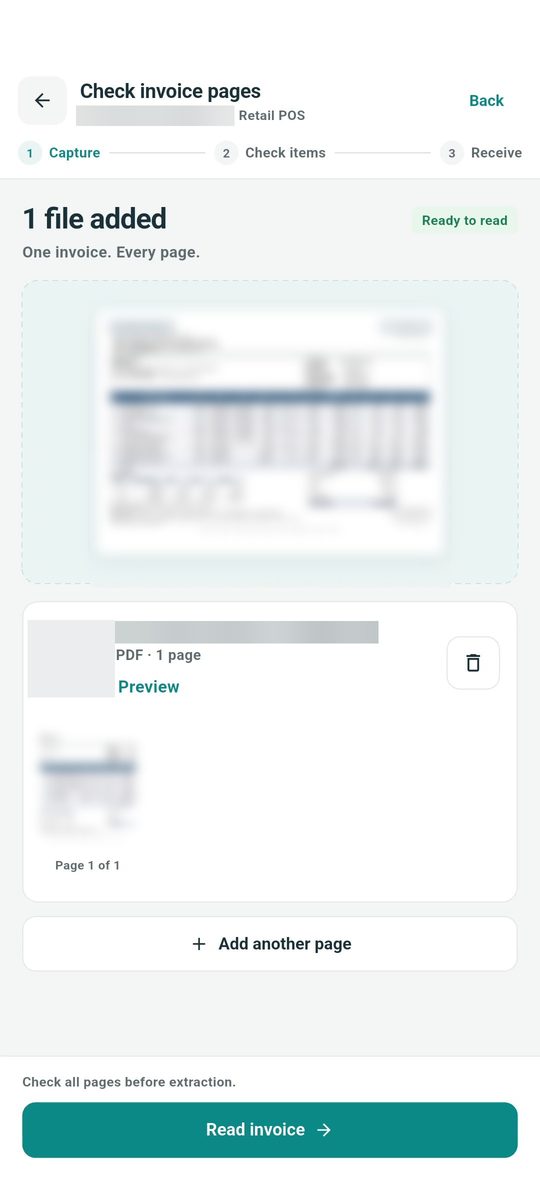 01 · Capture
Photograph or upload the bill
Snap every page, or upload a PDF or image of the invoice.
-
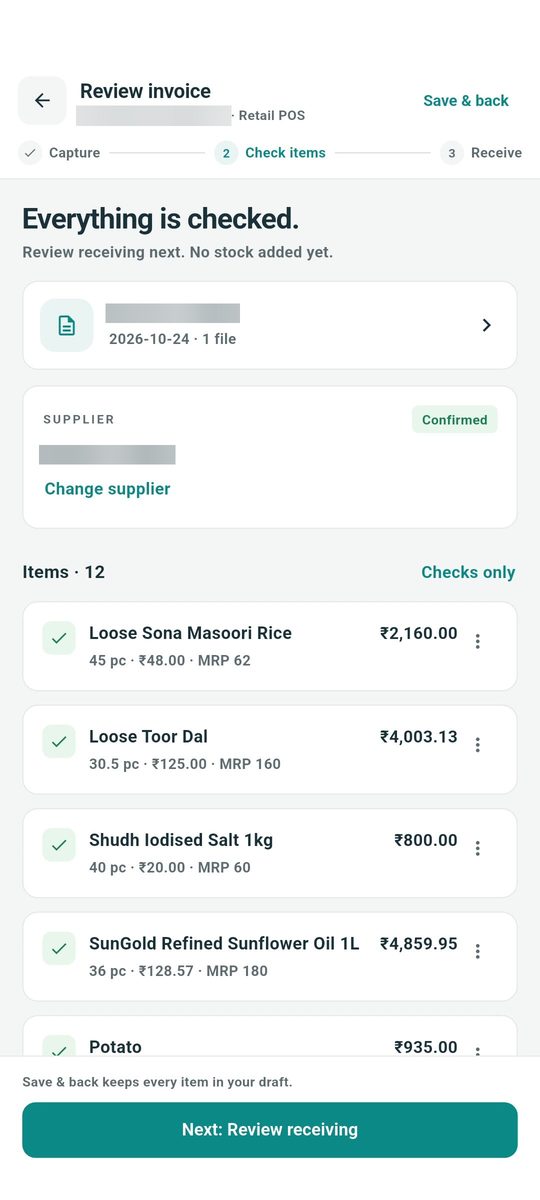 02 · Check items
Review what it read
Supplier, items, quantities, GST and totals, matched to your POS.
-
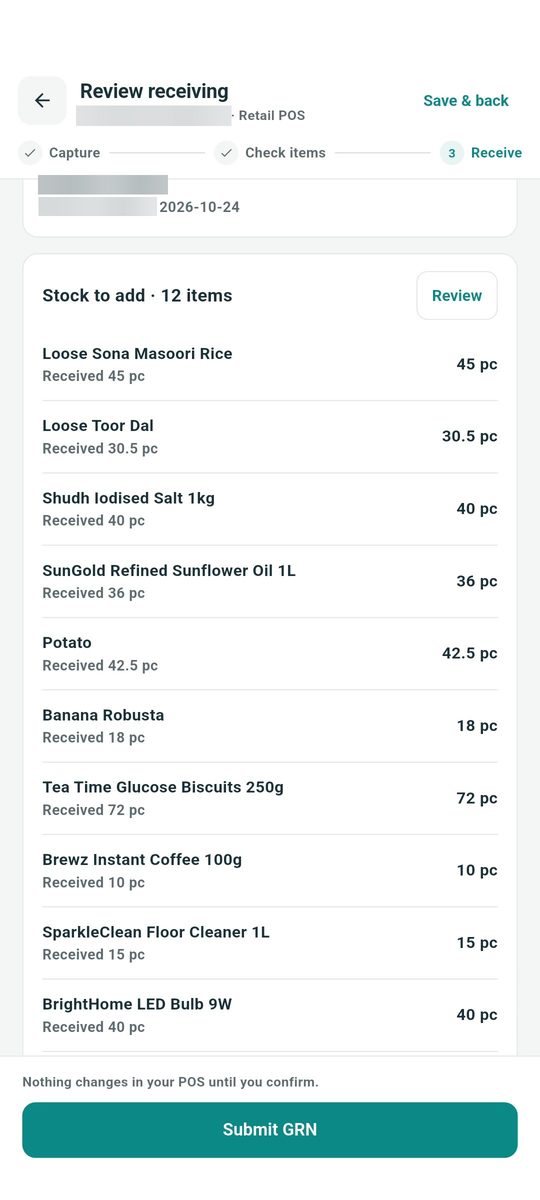 03 · Receive
Confirm what arrived
Enter the quantities you received, then submit the receipt to your POS.


Features
What Inward does
Matches each line
Each line on the bill is matched to your POS items and supplier. Pick another item, or add a new one, without leaving the receipt.
Converts cases to pieces
Cases are converted to pieces, with the cost per piece shown for every line.
Checks prices, GST and totals
The invoice total is compared with the calculated total before you continue.
Records what actually arrived
Enter the quantities you received, with remarks for the supplier or your accounts team.
Handles MRP and GST
Edit MRP and selling price on each item you receive, and when the invoice MRP differs, choose it or keep yours. Turn on “Price includes tax” when the bill’s costs include tax. A GST rate change on the bill updates the item master.
Learns your suppliers
Map an unmatched item once and Inward remembers it for that supplier.
Control
Nothing changes in your POS until you confirm
One final check
Store, invoice, item count and total on one screen, and a tick to confirm the goods were checked.
Status you can follow
Receipt prepared, accepted by your POS, then stock added.
Every receipt in one list
To do, Submitted and Stock added, searchable by supplier or invoice number.
Corrections stay in your POS
Once a receipt is submitted, corrections follow your usual POS process.


Built for NukkadShops POS
Works with the POS you already use
Retail POS
Creates goods receipts (GRN) in Retail POS. The user needs GRN access, which your store admin sets.
Retail POS →DINO POS
Creates raw material inwards for restaurants and cafés. The user needs Raw Material Inwards access.
DINO for F&B →Staff sign in with their POS login. Unfinished receipts are saved as drafts on the phone, and a payment you have already made can be noted against a receipt.
Questions, answered.
What is NukkadShops Inward?
An Android app that turns a photo of a supplier invoice into a goods receipt note (GRN) in Retail POS, or a raw material inward in DINO POS, so nobody types purchase entries line by line.
Who can use it?
NukkadShops Retail POS and DINO POS customers. Staff sign in with their existing POS username and password, with no separate sign-up. Ask support to switch Inward on for your store.
What access does a user need?
Your store admin gives the user GRN access in Retail POS, or Raw Material Inwards access in DINO POS.
Can it read multi-page bills and PDFs?
Yes. Photograph every page, or upload a PDF or image of the invoice.
What if an item on the bill isn’t in my POS?
Pick the right item or add it as a new one without leaving the receipt. Inward remembers your choice for that supplier.
Does it handle cases and cartons?
Yes. It converts cases to pieces and shows the cost per piece.
Will it change my stock without me checking?
No. Nothing changes in your POS until a staff member confirms and submits the receipt.
Can I edit a receipt after submitting it?
Corrections after submission follow your usual POS process.
Does it work for restaurants?
Yes. With DINO POS, Inward creates raw material inwards.
Is it on iPhone?
Inward is available for Android on Google Play.
Is my data safe?
Invoice text is read by Anthropic’s Claude, which does not train its models on it. Data travels over encrypted connections and is hosted on AWS, and only POS users with the right permissions can use the app. Invoice files are kept for up to 12 months, then deleted. Read the app’s privacy policy.
How do I get help?
Email support@nukkadshops.com, or call support on +91 99714 52453.
More from NukkadShops
Start with your next delivery.
Already on Retail POS or DINO POS? Install the app and ask support to switch Inward on for your store.
New to NukkadShops POS? Book a demo to see Inward on one of your own bills. Sales: +91 79970 95678 · hello@nukkadshops.com
Google Play and the Google Play logo are trademarks of Google LLC.